¶ Overview
This guide shows how to integrate Wiki.js with Keycloak using OpenID Connect (OIDC) so that users can log in using the central Keycloak identity provider.
Benefits:
- Centralized authentication across DevOps tools
- Users automatically created from Keycloak
- Role-based access in Wiki.js
- Works behind TLS-terminating reverse proxies
¶ Architecture
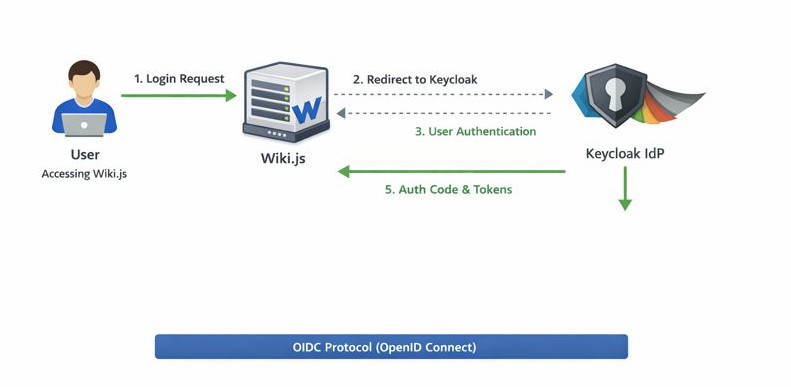
Key points:
- HAProxy handles TLS termination for the wiki frontend
- Wiki.js connects to Keycloak using the Keycloak OIDC strategy
- Self-registration allows automatic creation of users in Wiki.js
- Internal groups in Wiki.js manage access rights
¶ Keycloak Configuration
¶ 1. Create a new client in your realm for Wiki.js:
- Client ID: wikijs
- Client protocol: OpenID Connect
- Access type: Confidential
- Standard flow: ON
- Direct access grants: OFF
- Valid redirect URIs:
https://wiki.example.net/login/<instance-id>/callback
Web origins:
https://wiki.example.net
- Client authenticator: Client ID and Secret
¶ 2. Mapper configuration (to include claims in tokens):
| Mapper | Token claim | Notes |
|---|---|---|
username |
User property | Required for login |
email |
User property | Optional but recommended |
full name |
name | Optional but recommended |

¶ Wiki.js Configuration
1. Authentication → OpenID Connect → Keycloak strategy
2. Fill in:
| Field | Value | Notes |
|---|---|---|
| Host | https://keycloak.example.net | fully qualified url |
| Realm | <your realm> |
|
| Client ID | <your client id> |
what you configured in keycloak |
| Client Secret | <secret> |
Keycloak / client settings / credentials |
| Authorization URL | https://keycloak.example.net/realms/<realm>/protocol/openid-connect/auth |
|
| Token URL | https://keycloak.example.net/realms/<realm>/protocol/openid-connect/token |
|
| UserInfo URL | https://keycloak.example.net/realms/<realm>>/protocol/openid-connect/userinfo |
|
| Scopes | openid profile email |
|
| Self-registration | ON | to allow keycloak to create users |
| Default group | <Wiki.js internal group> (e.g., “Readers”) |
3. Save & Apply the configuration.
4. Test login: new Keycloak users are automatically created and assigned to the default group.

¶ Notes / Gotchas
- Callback URL must match exactly between Wiki.js and Keycloak. It is shown in the bottom of the wiki.js configuration screen for keycloak
- Wiki.js internal groups are used for authorization; Keycloak groups are nop used.
- TLS must be terminated at the reverse proxy; Wiki.js must see HTTPS (X-Forwarded-Proto).